ReaVerb
ReaVerb is an extraordinarily powerful reverb plug-in.
Kind: concept (effect-summary) Source: REAPER Effects Summary Guide v3.04
ReaVerb is an extraordinarily powerful reverb plug-in. You start with a blank canvas and build up your reverb effect using a combination of modules, listed in alphabetical order:
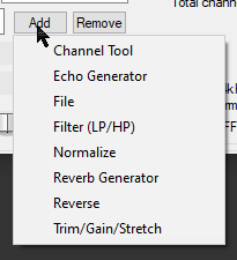
channel tools, echo generator, convolution reverb file, high/low pass filters, normalization, reverb generator, reverse reverb, time, time/gain/stretch. Modules are added by clicking the Add button and making a selection from the drop down list. Where you have more than one module, the order can be changed by dragging up or down your displayed list of selected modules. A module can be removed by selecting it and clicking on the Remove button. You can use as many modules in your reverb chain as you wish, but don't fall into the trap of thinking that because all these options are available, the more modules you use the better will be the results! Quite possibly a single module, such as reverb generator or a convolution reverb file, will be quite sufficient to meet your needs. The method used to “chain” different reverb modules together is explained, with examples, in the main REAPER User Guide. This chapter details the different parameters and controls of the various modules. Shortly, we'll take a look at each module individually, but first let's examine the overall ReaVerb environment, starting with the blank canvas.