ReaVocode
A Vocoder can be used to add a robotic, synthetic, sci-fi tone to a recorded track.
Kind: concept (effect-summary) Source: REAPER Effects Summary Guide v3.04
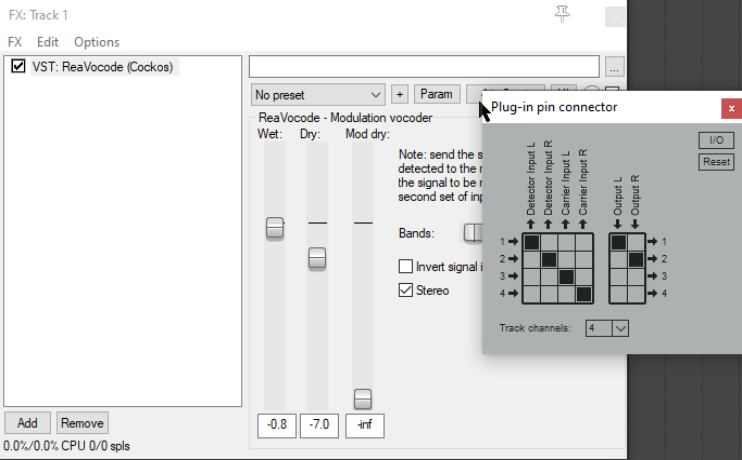
A Vocoder can be used to add a robotic, synthetic, sci-fi tone to a recorded track. You can set it up so that any track is modified by another. One common application uses a synthesizer to modify the sound of a vocal track. First, you should take the time to understand some terms that are used:
The detector track is the track which is being modulated – in this example, this would be the vocal. The modulator track (also known as the carrier) is the track that is used to modify the sound of the detector track. In the example that follows this would be a synthesizer.
Here's an example of how you could set this up.
Record the vocal on a track by itself. On a different track, use a VSTi to record the tune. Use a fairly bland sound – you can change this later. Make sure that both of these tracks have four channels. and that the their master/parent sends are both disabled: to do this, click on a track's I/O button and display its routing window. Create a new track and insert ReaVocode into its FX chain. This is the Vocoder track. Create a send from the detector track (vocal) to Channels 1/2 of the Vocoder track. Create a send from the modulator track (synth) to Channels 3/4 of the Vocoder track. Play the song, adjusting the vertical faders on the Vocoder to get the required balance. As you can see, there are few controls on this plug-in. They are explained below.
Wet Determines the amount of the processed (wet) detector signal mixed into the outgoing audio stream.
Dry Determines the amount of the unprocessed (dry) detector signal mixed into the outgoing audio stream.
Mod dry Determines the amount of the unprocessed (dry) modulator signal mixed into the outgoing audio stream.
Bands Specifies the number of frequency bands to be used in modulating the detector signal.
Invert signal inputs A toggle to swap the roles of the two incoming signals: the modulator becomes the detector and vice versa.
Stereo A toggle to enable/disable stereo output.
Once you've got the hang of it, you can explore the creative possibilities at your leisure. For example, use a vocal track to modulate a guitar to create a singing guitar effect.