Super8 MIDI Controlled Synchronizer
Super8 is an eight channel loop sampler.
Kind: concept (effect-summary) Source: REAPER Effects Summary Guide v3.04
Super8 is an eight channel loop sampler. You can record/play each channel independently, however when played together, the channels will always play back in sync with one another. Here is an overview. Follow the links at the bottom of this page for more information. Super8 has 8 outputs (1 for each channel), and a 9th which is the monitoring output. You can use this to set a separate monitoring mix for the selected channel (which can be useful for live performance). When you activate record for a channel and no other channels are active (recording or playing), you are simultaneously recording to that channel as well as defining the loop length. When you hit record or playback for that channel again, it ends the loop and immediately starts over - if you end the loop with "play", it starts only playing the loop you just recorded. If you end the loop with record, it starts overdubbing it. Some pointers to get you started:
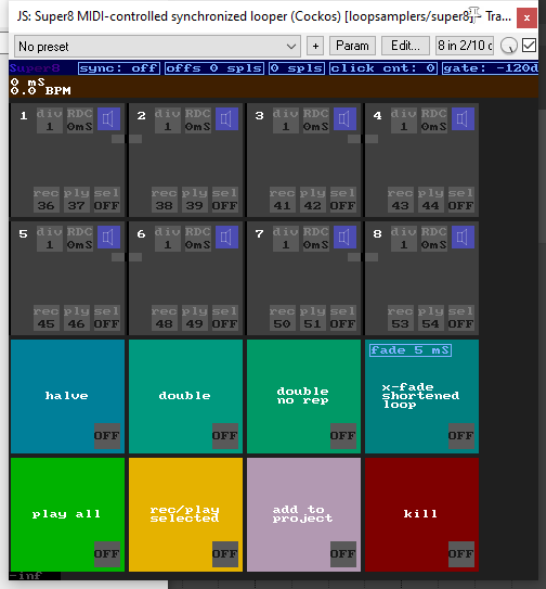
Each of the eight slots can record audio (not MIDI). Recording into the slots can be triggered from the GUI or from a controlling MIDI device. The first slot that you record into sets the length for all of the slots. Each channel has a number of controls, which are mappable to MIDI notes but also can be clicked on via the mouse: In the top right of each slot is the monitoring control. This has 3 modes: auto-monitoring (meaning it only monitors when this track is recording or focused). monitoring-on (always monitors), and monitoring off (never monitors: this can be used for example for live drums etc). On the left: reverse. this reverses the channel's sample Record button - this starts recording on the channel. If the channel is already playing back or recording, it sets overdubbing, otherwise it clears the channel before recording. Play button - this stops recording if recording, and starts playback. If the channel is already playing back, it stops the channel.
To download a sample project that uses the Super 8 MIDI Controlled Synchronizer, follow this link:
forum.cockos.com/showthread.php?t=169085 The above thread also contains a link to an instructional video, and more useful information.
See also https://forum.cockos.com/showthread.php?t=169085 for more helpful tips.
For Kenny’s awesome video see: https://www.youtube.com/watch?v=hiSTeVlinAg