ReaInsert
ReaInsert lets you use an external hardware effects device (such as a reverb unit) with your recorded audio material.
Kind: concept (effect-summary) Source: REAPER Effects Summary Guide v3.04
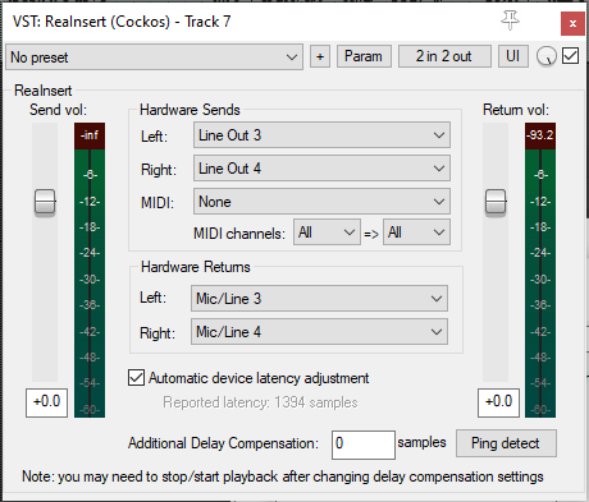
ReaInsert lets you use an external hardware effects device (such as a reverb unit) with your recorded audio material. It can also be used to send MIDI data to an external synthesizer for processing. The device needs to be connected to your sound card's inputs and outputs. Its controls are for the most part straightforward.
Send vol Controls the level of the signal being sent to the hardware effect.
Hardware Sends audio:
Left / Right Select the hardware outputs (from your sound card) to be used for sending left and right channels respectively.
Hardware Sends MIDI:
MIDI Device
Channels From/To Select the installed MIDI device (if any) to which you are sending data. Specify both source and destination channels.
Hardware Returns:
Left/Right Specify the hardware inputs (on your sound card) to be used for receiving the audio signal back from the hardware effects device or synthesizer.
Automatic device latency adjustment If enabled, automatically adjusts playback to compensate for any latency caused by the device.
Automatic Delay Compensation The Ping detect button can be used to estimate the degree of delay required to compensate for any latency introduced by the external device.
Return vol Controls the level of the signal returning to REAPER from your hardware device.