ReaSynth
ReaSynth is a synthesizer.
Kind: concept (effect-summary) Source: REAPER Effects Summary Guide v3.04
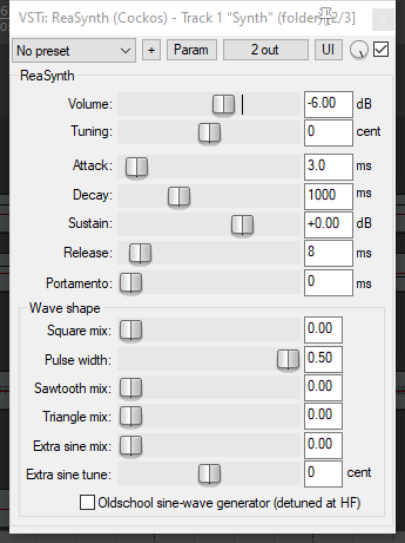
ReaSynth is a synthesizer. Inserted into a track's FX chain itcan be played using a MIDI keyboard or, indeed, REAPER's virtual keyboard. You can also insert empty MIDI items and use the MIDI editor to create your music and MIDI messages.
Its control parameters are described below.
Volume Sets the volume output level. A sensible approach is to start with this at a relatively low setting of around -10dB or so, then fade it up to suit.
Tuning Adjusts note or pitch of the output.
Attack This represents how long (in milliseconds) it takes for the sound to rise from an initial value of zero to its maximum level.
Decay This is the length of time takes for the sound to fall off to the sustain level.
Sustain The volume level at which the sound is sustained before it is released.
Release The time taken after the sustain period for the sound to fall away to zero.
Wave shape parameters The synthesizer sound is made up from a mixture of various wave forms of different shape. The remaining controls together shape this sound.
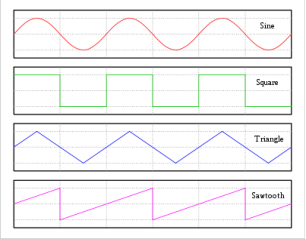
Square mix How much square wave is added to the sound.
Pulse width The width of pulses: the wider the pulses, the smaller will be the gaps between them.
Sawtooth mix How much sawtooth wave is added to the sound.
Triangle mix How much triangle wave is added to the sound.
Extra sine mix How much extra sine wave is added to the sound.
Extra sine tune Any adjustment to be made to the pitch of the additional sine mix.