ReaGate
ReaGate is a noise gate whose most common use is to filter out sound when the volume falls below a specified threshold level.
Kind: concept (effect-summary) Source: REAPER Effects Summary Guide v3.04
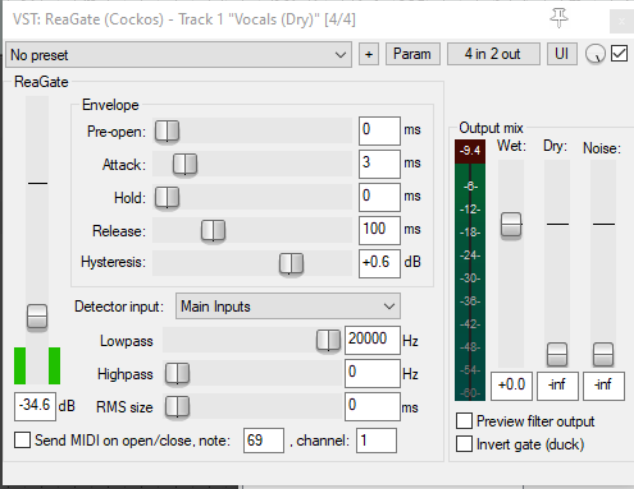
ReaGate is a noise gate whose most common use is to filter out sound when the volume falls below a specified threshold level. This can help to eliminate unwanted sounds, such as perhaps a vocalist drawing breath between verses. One feature of ReaGate is that like ReaComp it gives you the option of using an auxiliary signal, so that the gate on one track can be controlled by an audio signal on another track.
Threshold This is the unlabeled vertical fader on the left. It is used to specify the input signal level (volume) below which the gate should be engaged.
Pre-open This is the first of five parameters that together shape exactly how the noise gate behaves in opening and closing. Pre-open offers you the option to look ahead a specified number of milliseconds so that the Attack will be activated ahead of the volume actually falling below the Threshold.
Attack This determines the speed with which a closed gate reopens when the volume rises above the threshold. The lower this setting the more quickly it will go from letting thru 0% to 100% of the signal. Too fast a setting here can sometimes result in audible clicks.
Hold This determines how long the gate is held open (before closing) when the signal falls below the Threshold. Variations in Hold time can be used with Reverb plug-ins to help create gated reverb.
Release This determines the speed with which a gate closes when a signal falls below the threshold level (after the Hold time).
Hysteresis Think of this as fulfilling a similar function to the thermostat on a central heating system. It specifies a margin of flexibility around the Threshold level, to prevent the gate from constantly opening, closing, and “chattering.”
Detector input Determines whether the gate is controlled by the track or media item's own audio signal (Main Input) or by the signal from another source (Auxiliary Input).
Lowpass Specifies the highest frequency used to engage the gate (frequencies above this are ignored for the detection).
Highpass Specifies the lowest frequency used to engage the compressor (frequencies below this are ignored for the detection).
RMS Size Specifies the period of time to be used in calculating RMS (Root Mean Squared) values. In general, the higher this value, the less “fussy” will be the gate.
Send MIDI on open/close Enable this toggle to send MIDI note on/off messages when the gate opens or closes.
MIDI note and channel Note number and channel to use if Send MIDI option (above) is enabled.
Wet Sets the level of the processed signal in the output.
Dry Sets the level of the pre-gate unprocessed signal in the output.
Noise Allows a level of noise to be mixed back into the output.
Preview filter output When detector input is set to Auxiliary, enabling this toggle lets you to the output of the sidechain source.
Invert gate (duck) Enabling this toggle causes the polarity of the wet signal to be reversed relative to the dry signal. Whenever the gate is open, the two signals will phase-cancel. This enables ReaGate to be used in conjunction with a sidechain signal for 'ducking.”