ReaSamplomatic5000
ReaSamplomatic5000 is a plug-in that can be used to play a sample under MIDI control.
Kind: concept (effect-summary) Source: REAPER Effects Summary Guide v3.04
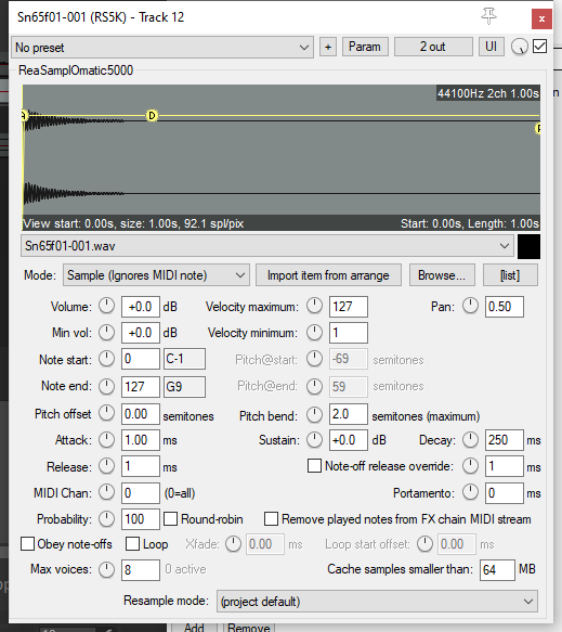
ReaSamplomatic5000 is a plug-in that can be used to play a sample under MIDI control. You can use multiple instances for multisamples patches and drum kits (as explained in the REAPER User Guide).
Mode A drop down list to select Freely configurable shifted, Sample (ignores MIDI note) or Note (semitone shifted).
Import item from arrange If an audio item is selected in the arrange window, this is used as the sample.
Browse Opens Explorer/Finder for you to select the sample file that will be played.
[list] Toggles open a window where you can build, store and manage a list of items.
Volume Sets the volume of the sample when triggered at the highest velocity.
Velocity maximum Sets the maximum velocity level.
Pan Used to pan the sound in the stereo mix towards left or right.
Min vol Sets the volume of the sample when triggered at the lowest velocity.
Velocity minimum Sets the minimum velocity level.
Note start Defines the MIDI note for which note-on messages will trigger the sample.
Pitch@start Specifies the pitch offset of the sample when it starts (Freely configurable and Note modes only)
Note end Defines the MIDI note for which note-on messages will stop the sample.
Pitch@end Specifies the pitch offset of the sample when it ends (Freely configurable and Note modes only)
Pitch offset Specifies a value (in semitones) to change the pitch of the sample.
Pitch bend Determines the amount of pitch variation allowed.
Attack Determines how quickly the volume of the sample rises when triggered.
Sustain How loud the sound rings out while the note is held.
Decay Determines how quickly the sound tails away after the release period.
Release Determines how long the sound is held.
Note-off release override A toggle which allows note-off release to be overridden by a specified time (ms).
MIDI Chan The MIDI channel(s) on which the plug-in listens for note-on and note-off messages.
Portamento Allows you to add a portamento effect.
Probability Determines the probability factor for beats, so that every cycle can be made different.
Round-robin A toggle which when enabled allows the same version of a sample to be used when it is repeated. It makes the application of probability somewhat deterministic. If you have, for example, a 20% chance, round-robin will ensure a response exactly every 5th note. With Round-robin disabled, each note is independently randomized.
Remove played notes from FX chain MIDI stream A toggle option which gives you the option of not passing played notes thru the FX chain.
Obey note-offs A toggle to allow note-off messages to be obeyed or ignored.
Loop Allows a properly configured sample to play with its loop section repeating until a note-off message is received.
Xfade Can be used to create a cross fade when looping.
Loop start offset Can be used to create a time offset, specified in milliseconds, when looping.
Max voices Determines the maximum number of samples that can be triggered concurrently without forcing a sample that is already playing to stop. The parameter control knob can be used to select any number between 1 and 16, or any other number up to 128 can be entered manually.
Cache samples smaller than Specifies a sample size below which data is to be cached. Using cache can improve speed of performance: how much cache is available to you will depend on your computer's RAM size.
Resample mode A drop down list with a ranger of choices varying by quality from Low to Best or by speed from Fast to Extreme. You also have the option of using the Project Default, as specified in your Project Settings dialog.