8.1.2 The Vox
The FX chain on the Vox track is very similar to that used in the Smokey Vocals example that was analysed earlier in this Mixing Primer.
Kind: concept (reamix-section) Chapter: 8 Case Study 3: Don’t Keep Me Waiting Source: ReaMix (October 2009)
The FX chain on the Vox track is very similar to that used in the Smokey Vocals example that was analysed earlier in this Mixing Primer. The key technique here is that by Channel Splitting we are able to apply different FX to different frequency ranges, then mix those FX back in with a different frequency range. This is what adds the edgy feeling (or tension) to the voice.
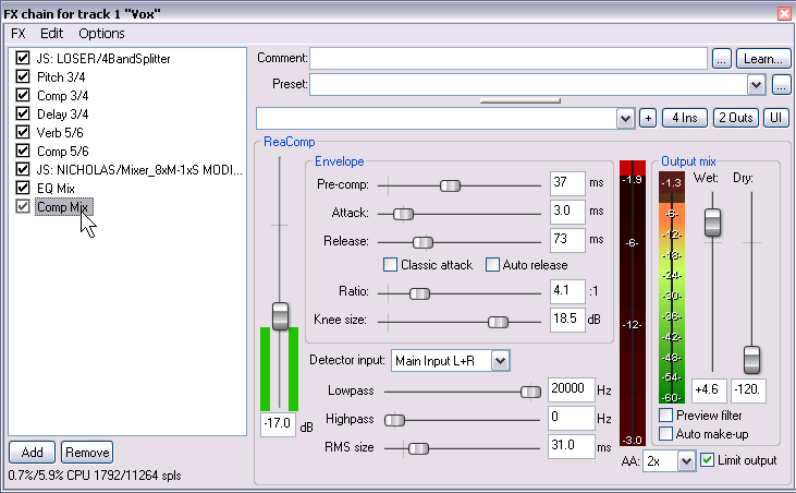
This technique is used with all of the first four effects applied immediately after the Four Band Splitter – ReaPitch, ReaComp, ReaDelay and ReaVerbate. You can examine each of these FX windows to see how this is applied.
The four audio streams are merged together using the 8xM-1xS Mixer. After that, a little EQ is used to make the vocal a touch more present even than before, then a little final compression to smooth off some of the very roughest edges on the vocal.
You can evaluate for yourself the effect of any individual FX item by setting it to bypass while the track is played.