2.4 EQ: Bandwidth and Type
EQ is probably the one type of plug-in that you will use more than any other.
Kind: concept (reamix-section) Chapter: 2 Pre Mix Fix: Corrective Action Source: ReaMix (October 2009)
EQ is probably the one type of plug-in that you will use more than any other. Throughout this Mixing Primer, we will primarily be using the plug-in ReaEQ, the parametric EQ plug-in that is supplied with REAPER. Happily, it has only a small number of parameters, at least compared with other types of plug-in. It’s worth taking time to make sure that you are comfortable with each of these parameters.
Parameter Comments
Add Band
By default, the ReaEQ screen displays four bands, but you can add more if you wish.
Delete Band
Deletes the currently selected band.
Enabled
This is a toggle that enables or disables the currently selected band. Useful when you are testing the effect of your settings.
Frequency
Determines the frequency at which the Gain and Bandwidth settings for the currently selected band will be applied.
Gain
Determines the value of decibels by which the volume at the currently selected frequency will be increased or decreased.
Parameter Comments
Bandwidth
Determines the number of octaves across which the gain will be applied. The normal range is between 0 and 4.
Band Type
Determines the type of band. The options are explained below.
High Pass
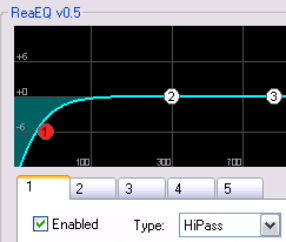
Allows only frequencies above that specified to pass through the filter and be heard.
Low Shelf
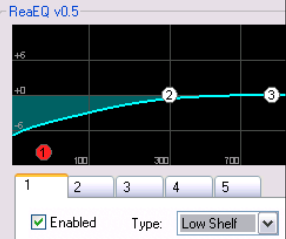
Similar to a High Pass filter but more gradual in its effect.
Band
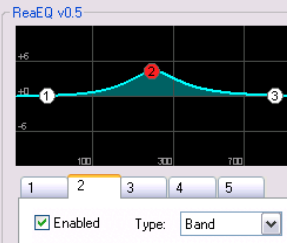
Determines the central frequency at which the gain or reduction is applied. The bandwidth setting determines the range that will be affected.
The type Band (deprecated) is similar to Band, and reflects the way earlier versions of ReaEQ behaved.
Bandpass
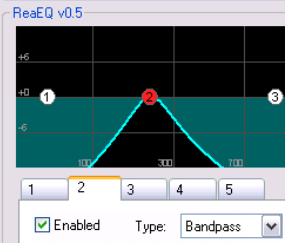
Allows only that range of frequencies centred on the frequency to pass through the filter and be heard. Can be useful when sweeping a track seeking to identify problem frequencies or key frequencies.
Parameter Comments
Notch
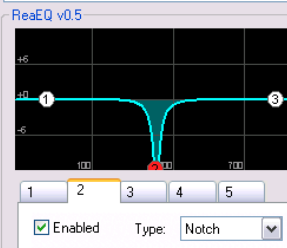
A special kind of Band filter, used for applying a sharp reduction in volume at a highly targetted frequency.
Low Pass
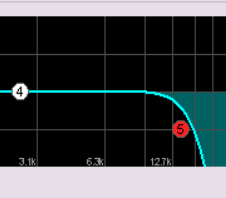
The opposite of a High Pass Filter. Allows only frequencies below the specified frequency to be heard.
High Shelf
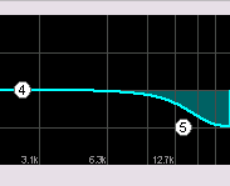
Similar to Low Pass but creates a more gradual transition.
Show Phase
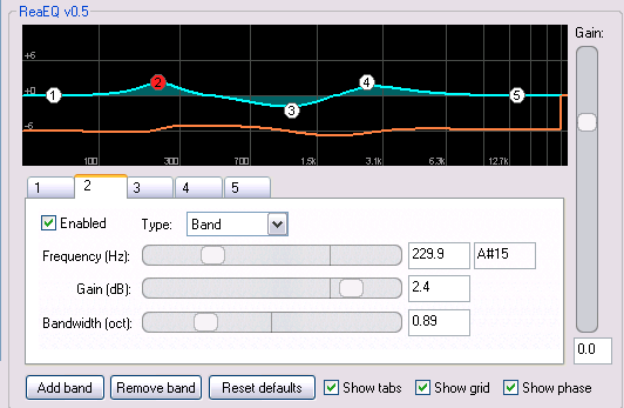
Enables you to check the phase shift implications of your EQ settings. Let your ears be your best judge!
Gain
The gain fader can be used to adjust the overall signal level (increase or decrease) after the effects of your EQ settings have been applied.