3.2 Designing a Virtual Stage
It isn’t necessarily true that great minds think alike.
Kind: concept (reamix-section) Chapter: 3 Spatial Mixing Source: ReaMix (October 2009)
It isn’t necessarily true that great minds think alike. Sometimes equally gifted people will approach the same task with completely different systems and methodology. The best approach is that which works for you. Some sound engineers insist that you should always mix only with your ears, and ignore all other sensory input. Others, myself included, would say that if you think that making use of other senses (such as visual senses) can help you then you’d be best advised to use them.
Some people like to sketch out a virtual sound stage before they begin their mixing. It gives them a starting point when it comes to positioning the different instruments in the mix. Others see no point in it but prefer to simply play it by ear. Ultimately you’ll have to decide for yourself whether you like this idea, but you should certainly give it some consideration.
Try sketching out an overhead view of the stage layout that you are aiming to create with your mix. A couple of examples are shown below:
Consider the two illustrations below.
The first is for a song that features a lead vocalist, two backing vocalists, a rhythm guitar, banjo, acoustic bass and drum kit. We might have it in mind to create a sound stage like that shown below (as viewed from above), where front of stage is at the bottom of the diagram.
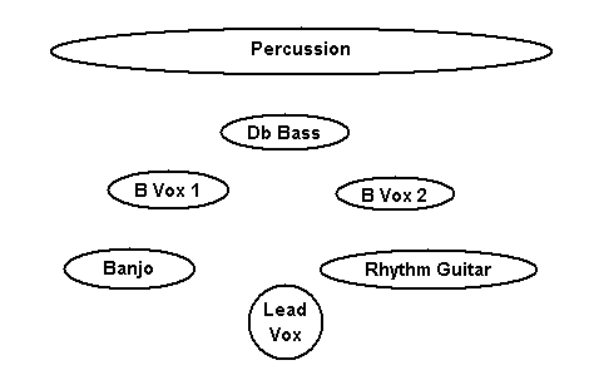
This helps us decide not only how best to pan our instruments, but as you will shortly see, also where we will wish to use other techniques (such as the use of EQ and/or Reverb) to make instruments appear further forward or back in the mix,
Now consider the second picture (below).
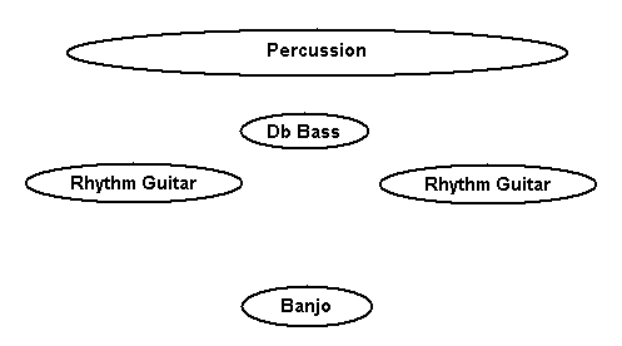
Suppose this song includes a break in which we wish to feature the banjo. This leaves us with what might be a rather thin mix. We might decide that whilst bringing the banjo right up front and centre stage, we might also wish to not only push the rhythm guitar further back, but also somehow to spread it out so that it appears to fill most of the space behind the featured instrument.
During this chapter of this book, you will be shown how to create effects like this.