1.6 Sort Out Your Takes
If there are any tracks where you have recorded more than one take, get all your take edits organised before you start mixing.
Kind: concept (reamix-section) Chapter: 1 Before We Begin …. Source: ReaMix (October 2009)
If there are any tracks where you have recorded more than one take, get all your take edits organised before you start mixing.

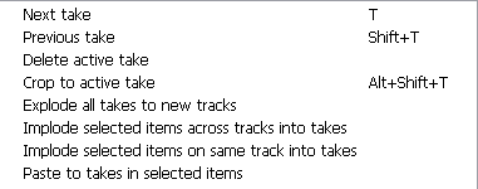
Make sure that you understand fully how to manage and work with multiple takes. In particular, you should be able to use the various commands on the Takes context menu, including Explode all takes to new tracks, Implode selected items across tracks into takes, Implode selected items on same track into takes and Paste to takes in selected tracks.
Remember also that the Item Properties dialog box includes an option to Play all takes if you wish.
When you have finished organising your takes and are ready to start mixing, you’ll probably find it easier to work if you turn off the option to Show all takes in lanes. This has the effect of presenting a track which has been sliced together from various takes in the manner shown below.

For further information about working with takes, you should consult the REAPER User guide.