sliced-button
3-slice image (left to right) of button images (normal, mouseover, pressed).
Kind: glossary-entry (image-type)
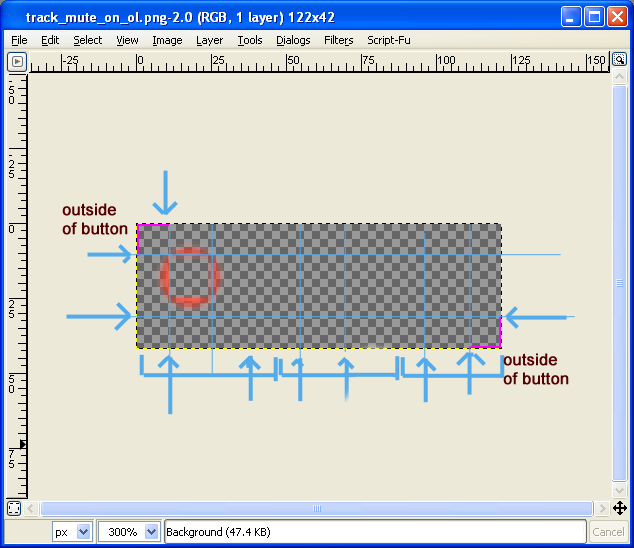
3-slice image (left to right) of button images (normal, mouseover, pressed). Can include pink lines for edge scaling. Can also have overlay image (imagename_ol.png), if enabled in rtconfig.txt, which includes pink lines to define outer extent.
The image should be 3 images next to eachother, for normal, mouseover, and mouse pushed images. Alpha channel is supported. The image will be stretched to fit any buttons:
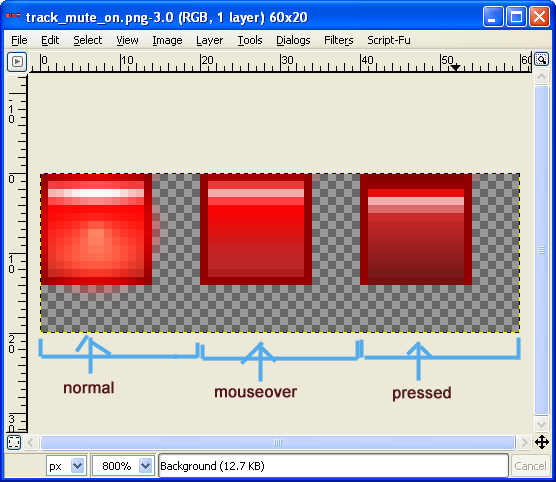
Normally these images will be a multiple of 3 in width (since there are 3 sub-imageas). You can also use pink lines similar to the background image, in which case the width will be 2 pixels greater than a multiple of 3.
If use_overlays is set to 1, overlay images will also be loaded if found for buttons. Overlay images are useful for drawing shadows or highlights of buttons, typically outside of the button (and inside if you want it to interact nicely with other shadows as well). These images are named image_name_ol.png (i.e. track_mute_off_ol.png). These images will typically be mostly transparent, and are similar in format to the normal button image, except they should have pink lines in the upper left and lower right corners to delimit the area that would be outside of the button region. Overlays can also include yellow with their pink, in which case the yellow defines the outer area, and the pink defines the stretch region.