Scrollbar image
A tutorial for scrollbar skinning is available here.
Kind: glossary-entry (image-type)
A tutorial for scrollbar skinning is available here.
- scrollbar.png: This image contains all the scrollbar elements. It needs to have a dimension of 204x238px. The pink (RGB color: 255,0,255) sections determines how each slice will be stretched. The areas delimited by the pink color will not be stretched.
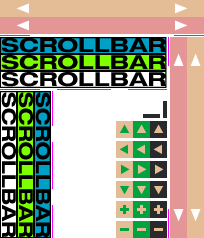
The ordering of slices is as follows:
- Horizontal scrollbar background (off state) - (0,0)-(204,17)
- Horizontal scrollbar background (on state) - (0,17)-(204,34) The horizontal scrollbar has 2 pink areas defined on line 35, one for each side of the scrollbar.
- Vertical scrollbar background (off state) - (170,37)-(187,238)
- Vertical scrollbar background (on state) - (187,37)-(204,238) The vertical scrollbar has 2 pink areas defined on column 168, one for each side of the scrollbar.
- Horizontal thumb (off state) - (0,37)-(167,54)
- Horizontal thumb (mouseover state) - (0,54)-(167,71)
- Horizontal thumb (on state) - (0,71)-(167,88) The horizontal thumb has 3 pink areas defined on line 89: left, middle and right sides.
- Vertical thumb (off state) - (0,91)-(17,238)
- Vertical thumb (mouseover state) - (17,91)-(34,238)
- Vertical thumb (on state) - (34,91)-(51,238) The vertical thumb has 3 pink areas defined on column 52: top, middle and bottom sides.
- Up button (116,121)
- Left button (116,141)
- Right button (116,161)
- Down button (116,181)
- Zoom in button (116,201)
- Zoom out button (116,221) Each button is 17x17px and has 3 states: off, mouseover, pushed.
- Horizontal zoom in/out delimiter (163,101)-(167,118)
- Vertical zoom in/out delimiter (143,114)-(160,118)